Best Webcam Buying Guide for Creators (2026)
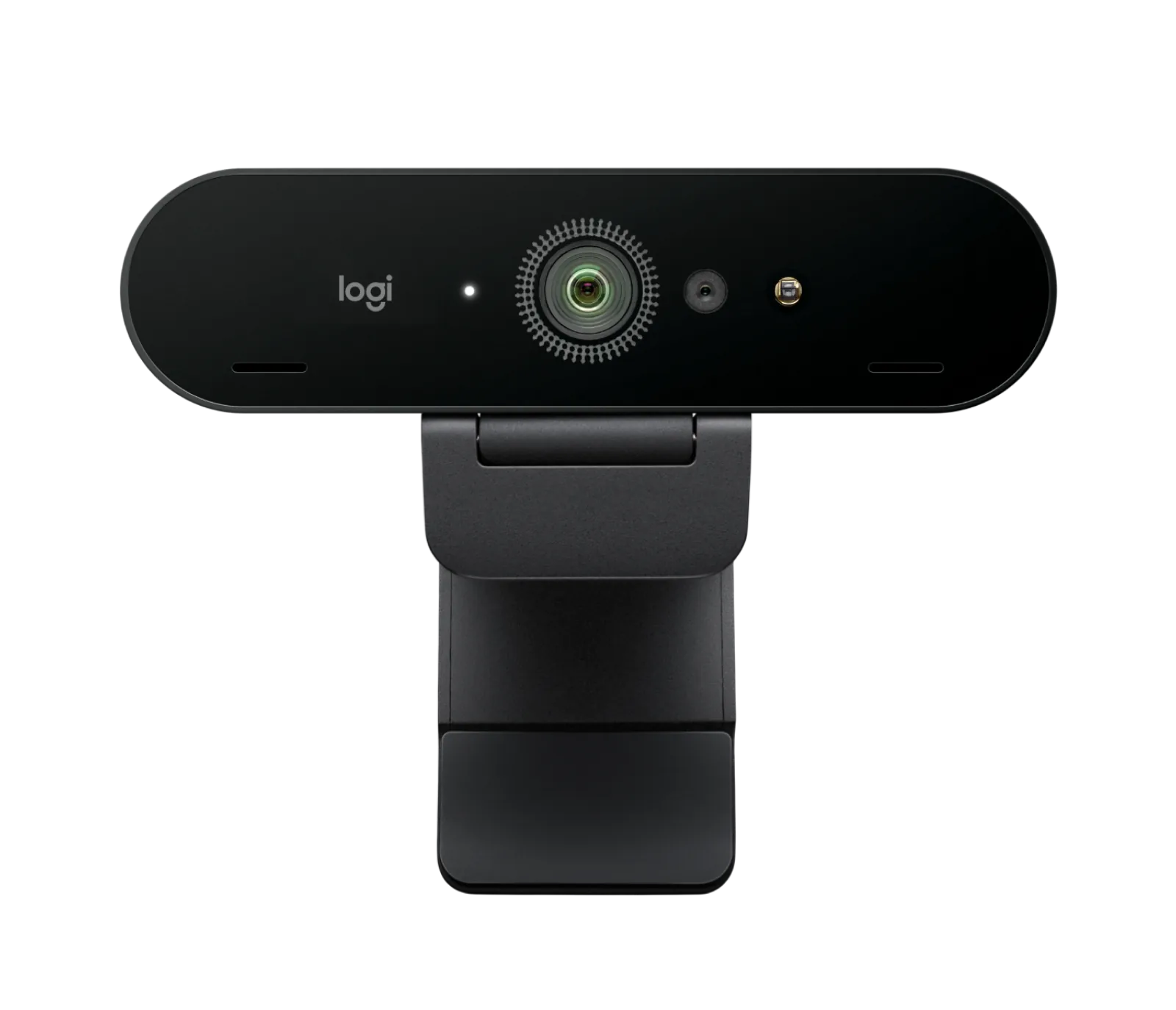
For streaming, calls, and talking-head videos, a good webcam plus good lighting beats an expensive camera in a dark room. These twelve webcams cover the full range — from 4K flagships and AI-tracking gimbals to budget picks that genuinely punch above their price. (Honest note: proper lighting matters more than any webcam on this list. Fix your light first.)
How this guide works: picks are based on published manufacturer specs, official list prices, and the consensus of independent reviewers (Tom's Hardware, Tom's Guide, RTINGS and others) — checked and refreshed in November 2026. This is a research-based buying guide, not a hands-on lab test, and we say so rather than pretend otherwise.
As an Amazon Associate we earn from qualifying purchases — read our full disclosure. List prices below are the manufacturers' published prices at the time of writing; street prices move constantly, so use the links to check today's price.
The 12 webcams at a glance
| Webcam | Max resolution | Focus | Field of view | Built-in mic | Best for |
|---|---|---|---|---|---|
| Logitech MX Brio | 4K/30, 1080p/60 | Autofocus | 65° / 78° / 90° | Yes — dual beamforming | Best overall |
| Insta360 Link 2 | 4K/30, 1080p/60 | PDAF autofocus | 79.5° | Yes — dual noise-cancelling | Presenters, tracking |
| Elgato Facecam Pro | 4K/60 | Autofocus | Up to 90° | None | Premium 4K60 image |
| Elgato Facecam 4K | 4K/60 (HDR 4K/30) | Fixed | Up to 90° | None | 4K on a mid budget |
| Logitech Brio 4K | 4K/30, 1080p/60 | Autofocus | 65° / 78° / 90° | Yes — dual omni | Proven 4K all-rounder |
| Elgato Facecam MK.2 | 1080p/60 | Fixed | Up to 82° | None | Streamers on 1080p |
| OBSBOT Tiny 3 | 4K/30, 1080p/120 | Autofocus | ~74° | Yes — triple array | AI tracking, movement |
| Razer Kiyo V2 | 4K/30 | Autofocus | 93° | Yes — dual stereo | Wide framing, value 4K |
| Logitech Brio 500 | 1080p/30 | Autofocus | 65° / 78° / 90° | Yes — dual beamforming | Work calls |
| Logitech C920s | 1080p/30 | Autofocus | 78° | Yes — dual stereo | The budget classic |
| Logitech Brio 300 | 1080p/30 | Fixed | 70° | Yes — single, noise-reducing | Modern budget pick |
| EMEET NOVA 4K | 4K/30 | PDAF autofocus | 73° | Yes — dual noise-cancelling | Cheapest real 4K |
How to choose a webcam (the buying guide part)
Most webcam regret comes from buying the spec sheet instead of the use case. Work through these six things in order:
- Sensor and light first. A bigger sensor (look for 1/1.8", 1/1.28", 1/2" class sensors) beats a bigger resolution number in any real room. And no sensor saves a dark room — budget for a key light before you budget for 4K.
- Frame rate beats resolution for live video. Twitch, YouTube Live and Zoom show your audience 1080p at best. 1080p/60 looks smoother and more "pro" than 4K/30. Buy 4K for recorded videos you crop in editing, or for future-proofing — not for streaming bragging rights.
- Focus: autofocus if you move, fixed if you don't. If you sit at a set desk distance, a fixed-focus lens (Facecam MK.2, Facecam 4K, Brio 300) is actually sharper and never hunts. If you lean, gesture or present standing up, you need autofocus — or a tracking camera.
- Field of view fits the frame. 65–78° is a tight, flattering head-and-shoulders frame. 90°+ shows your room — good for whiteboard teaching, bad for a messy bedroom.
- The microphone question. Some of the best webcams here — Elgato's entire Facecam line — have no microphone at all. Most built-in mics are call-grade, not content-grade. If your voice is part of the product, pair your webcam with a budget USB microphone.
- Software is half the product. Logi Tune, Elgato Camera Hub and OBSBOT Center unlock manual exposure, white balance and framing control. A webcam you can tune beats a "smarter" one you can't.
1. Logitech MX Brio — best overall
Logitech's current flagship and the default premium pick in almost every 2026 roundup. Its 8.5MP Sony STARVIS sensor has pixels 70% larger than the older Brio 4K, which shows up exactly where it matters: normal room lighting. Add a built-in privacy shutter, Show Mode for desk presentations, and the best webcam microphone Logitech ships, and it's the easiest recommendation on this page. List price is around $199.99 USD.
Pros
- Best image quality of any Logitech webcam
- Strong dual beamforming mics with AI noise reduction
- Privacy shutter and Show Mode built in
Cons
- 4K is capped at 30fps
- Full control needs the Logi Tune app
- Premium price — budget buyers should look below
Who should skip: anyone who presents standing or moving — the Insta360 Link 2 and OBSBOT Tiny 3 track you; this one can't.
As an Amazon Associate we earn from qualifying purchases.
2. Insta360 Link 2 — best for presenters
A 4K webcam on a 2-axis gimbal that physically turns to follow you, with fast PDAF autofocus and genuinely good noise-cancelling mics. Teachers, fitness creators, coaches and anyone who demos products on camera: this is the pick that makes a one-person shoot feel like it has a camera operator. List price is around $199.99 USD (its fixed sibling, the Link 2C, goes for about $149.99).
Pros
- AI tracking on a real gimbal — follows you around the room
- Sharp 4K with fast phase-detection autofocus
- Among the best built-in mics on any webcam
Cons
- The gimbal is wasted money if you sit still
- Takes more desk presence than a fixed webcam
- Tracking can lose you if you move very fast
Who should skip: desk-bound streamers — at the same money, the MX Brio's bigger-looking image serves you better.
As an Amazon Associate we earn from qualifying purchases.
3. Elgato Facecam Pro — the 4K60 flagship
The only mainstream webcam that does true 4K at 60fps, with autofocus and Elgato's Camera Hub software, which gives near-mirrorless manual control. The catch is the same as the whole Facecam line: there is no built-in microphone, so budget for a separate mic if you don't already own one. List price is around $299.99 USD.
Pros
- True 4K/60 — nothing else here matches it
- Most camera-like image and controls in a webcam
- Autofocus from 10 cm to infinity
Cons
- No built-in microphone at all
- The most expensive mainstream pick here
- Needs good light and a fast USB connection to shine
Who should skip: anyone without a separate microphone, and anyone on a mid budget — the Facecam 4K below gets you most of the way for $100 less.
As an Amazon Associate we earn from qualifying purchases.
4. Elgato Facecam 4K — 4K60 for less
Elgato's newer mid-tier 4K model (launched 2025): 4K/60 with a large 1/1.8" Sony STARVIS 2 sensor and a 49mm filter thread, so you can add ND or diffusion filters like a real camera. It trades the Pro's autofocus for fixed focus and a slower f/4.0 lens — so it wants light, and it wants you seated at a steady distance. Like all Facecams, no microphone. List price is around $199.99 USD.
Pros
- 4K/60 at a mid-tier price
- Big sensor and a real filter thread
- Same excellent Camera Hub software
Cons
- Fixed focus — set your distance and stay there
- f/4.0 lens needs a well-lit room
- No built-in microphone
Who should skip: anyone who moves around on camera, or streams from a dim room.
As an Amazon Associate we earn from qualifying purchases.
5. Logitech Brio 4K — the proven all-rounder
The original 4K flagship (sold as the BRIO 4K Pro Webcam) is still on sale and still good: true 4K, reliable autofocus, switchable field of view, Windows Hello face login, and software that works everywhere. Honest advice, though: its list price sits around the MX Brio's (~$199.99 USD), and the MX Brio's sensor is a generation newer. Buy the Brio 4K when you find it discounted — which happens often — not at full price.
Pros
- True 4K with good detail and reliable autofocus
- Windows Hello support
- Frequently discounted well below list price
Cons
- Older, smaller sensor than the MX Brio
- 4K at 30fps only
- Image can look processed next to the Facecams
Who should skip: anyone paying full list price — the MX Brio is the better buy at the same money.
As an Amazon Associate we earn from qualifying purchases.
6. Elgato Facecam MK.2 — best 1080p for streamers
The streamers' 1080p pick: a 1/2.5" Sony STARVIS sensor, fixed focus set for desk distance, and an image that looks natural instead of "webcammy." It does 1080p/60 (and 720p/120 for slow-motion fun), and its price has dropped to around $119.99 USD, which makes it better value than it was at launch. No 4K, and — say it again — no microphone.
Pros
- Most natural 1080p image in its class
- Smooth 1080p/60, HDR handles backlight well
- Price has dropped since launch
Cons
- Fixed focus — punishes movement
- No 4K at all
- No built-in microphone
Who should skip: anyone recording content they want to crop in 4K, and anyone who leans in and out of frame.
As an Amazon Associate we earn from qualifying purchases.
7. OBSBOT Tiny 3 — the AI tracking powerhouse
OBSBOT's current tracking flagship pairs a big 1/1.28" sensor with AI subject tracking, voice and gesture control, and a triple-mic array — reviewers call its tracking unmatched. It also does 1080p at 120fps, which no other pick here matches. It's the most expensive webcam on this page (~$349 USD; the Tiny 3 Lite is ~$199), and it's the right spend only if movement is your format. (The older Tail Air you may see in other guides is a standalone streaming camera, not a desk webcam — we've left it off this list deliberately.)
Pros
- Best-in-class AI tracking with voice + gesture control
- Large sensor, strong low-light image
- 1080p/120 for high-frame-rate capture
Cons
- The priciest pick here
- Tracking features are wasted at a static desk
- Full control lives in OBSBOT's app
Who should skip: seated streamers — the Link 2 tracks well for $150 less, and fixed webcams cost half as much.
As an Amazon Associate we earn from qualifying purchases.
8. Razer Kiyo V2 — Razer's current pick
First, a public-service note: the original Kiyo Pro that older guides recommend has been discontinued, and remaining stock often sells at silly prices. Razer's current model is the Kiyo V2: 4K/30 from a Sony STARVIS sensor, a wide 93° field of view, and dual stereo mics, for around $149.99 USD. (The Kiyo Pro Ultra's giant 1/1.2" sensor is still the low-light king on paper, but availability is fading — buy only from a seller you trust, at a sane price.)
Pros
- Honest 4K value at a mid price
- Wide 93° field of view suits shared frames
- Good stereo mics for a webcam
Cons
- No 60fps mode at 4K or 1080p headline spec
- Full control needs Razer Synapse
- Less reviewer coverage than Logitech/Elgato rivals
Who should skip: low-light streamers chasing the old Kiyo Pro's reputation — fix your lighting instead; it's cheaper than the resale markup.
As an Amazon Associate we earn from qualifying purchases.
9. Logitech Brio 500 — best for work calls
The mainstream work-from-home pick: clean 1080p, autofocus, auto light correction and framing, dual noise-reducing mics, and a privacy shutter, in a neat little cylinder that looks good on a monitor. List price is around $129.99 USD and it is discounted often. It's not trying to be a creator flagship — it's trying to make you look competent on every call, and it does.
Pros
- Auto-framing and light correction that just work
- Good mics and a built-in privacy shutter
- USB-C, tidy design
Cons
- 1080p ceiling — no 4K path
- Creators will outgrow it
- Show Mode is basic next to the MX Brio
Who should skip: anyone making content for a living — step up to the MX Brio.
As an Amazon Associate we earn from qualifying purchases.
10. Logitech C920s — the budget classic
The C920 line has been the default recommendation for a decade because it's good enough for almost everything: sharp 1080p, reliable autofocus, dual mics, and a privacy shutter, usually around $59.99–69.99 USD. It is an aging design — USB-A, weak low light — but at its street price it remains the safest cheap answer in webcams, and the savings belong in your lighting budget.
Pros
- Proven 1080p quality at a budget price
- Autofocus and a privacy shutter
- Works everywhere, zero fuss
Cons
- Aging design; struggles in low light
- USB-A in a USB-C world
- Fixed, slightly wide field of view
Who should skip: creators who want their stream to look premium — the image is "fine," never impressive.
As an Amazon Associate we earn from qualifying purchases.
11. Logitech Brio 300 — the modern budget pick
The C920s' modern successor for most people: 1080p, a noise-reducing mic, a privacy shutter and USB-C in a tiny cone, listing around $59.99 USD and often sold for less. The trade-off is fixed focus — fine at a normal desk distance, unforgiving if you lean right into the lens. If your setup is a laptop on a desk and your budget is firm, this is the one.
Pros
- USB-C and a privacy shutter at a budget price
- Compact, tidy design
- Noise-reducing mic is call-friendly
Cons
- Fixed focus only
- Single microphone
- 1080p/30 ceiling
Who should skip: anyone who moves toward and away from the camera — the C920s' autofocus handles that better for similar money.
As an Amazon Associate we earn from qualifying purchases.
12. EMEET NOVA 4K — the budget 4K surprise
EMEET's NOVA brings real 4K to a budget price (around $59.99 USD at EMEET's own store) with PDAF autofocus that works and dual noise-cancelling mics. One honest caveat: it starts in 1080p out of the box — enable 4K through the EMEETLINK software or OBS. It won't dethrone the MX Brio on image processing, but if you want "4K" on the box without the premium, this is the honest pick.
Pros
- 4K at a budget price
- PDAF autofocus and auto light correction
- Privacy cover included
Cons
- 4K must be enabled via software — not on by default
- Image processing trails Logitech/Elgato
- Low-light performance is average
Who should skip: creators who need the most reliable, best-processed image — pay for the MX Brio or a Facecam.
As an Amazon Associate we earn from qualifying purchases.
The bottom line
Best overall: Logitech MX Brio. Presenters who move: Insta360 Link 2 (or the OBSBOT Tiny 3 if tracking is your whole format). Best image money can buy: Elgato Facecam Pro — plus a microphone, because it hasn't got one. Work calls: Logitech Brio 500. Tightest budget: EMEET NOVA 4K for cheap 4K, Logitech Brio 300 or the classic C920s if it isn't. And seriously: a $100 light upgrade improves any webcam here more than a $200 webcam upgrade.
FAQ
What should I look for when buying a webcam?
In order: sensor size and low-light performance (bigger sensors look better in real rooms), frame rate (60fps looks smoother than 4K30 for streaming), focus type (autofocus if you move, fixed focus is fine at a fixed desk distance), field of view that fits your framing, and a microphone plan — some of the best webcams, including Elgato's whole Facecam line, have no mic at all. See the buying guide section above for the full walkthrough.
Is 4K worth it for streaming?
Usually not — most platforms deliver your stream at 1080p anyway. 4K helps for recorded content (cropping flexibility) and future-proofing. For pure streaming, 1080p60 with great lighting looks better than 4K in a dark room.
What is the best webcam under $100?
Around that budget, the Logitech Brio 300 and C920s are the safe picks, and the EMEET NOVA 4K is the cheapest way to get 4K on the spec sheet. Prices move constantly, so check the links in this guide for today's number before deciding.
Do webcams have good built-in microphones?
Most webcam mics are fine for calls and disappointing for content. Two warnings: Elgato's Facecam line has no microphone at all, and even the best webcam mic loses to a budget USB microphone. If your voice matters, pair any webcam here with a dedicated mic.
Webcam vs mirrorless camera for streaming?
A mirrorless camera (like the Sony ZV-E10) looks dramatically better but costs 5–10× more once you add capture hardware. Start with a webcam + great lighting; upgrade the camera when your audience justifies it.
Why does my webcam look bad even though it's 4K?
Almost always lighting. Webcam sensors are tiny and need lots of light. Add a key light (see our lighting guide) before blaming the camera.
Do I need the manufacturer's software?
For basic use, no — every webcam in this guide works plug-and-play. But the software (Logi Tune, Elgato Camera Hub, Synapse) unlocks manual exposure, white balance and field-of-view control that's worth the install.
Related: Best budget microphones · Best lighting kits · Streaming setup guide · Sony ZV-E10 review · Affiliate disclosure

 Google Analytics Certified
 Google Ads Search Certified
 Certified